Samsung Gallery Sync with Google Storage Rolls Out Across Galaxy Devices
What changed
Samsung Electronics has launched Samsung Gallery sync with Google storage, a new cross-device photo and video sync service built directly into the Samsung Gallery app. The service lets Galaxy phone and tablet owners view their media across supported devices by signing in with the same Samsung and Google accounts on each device. No separate cloud account is needed — the feature uses the Google account already on the device.
How it works
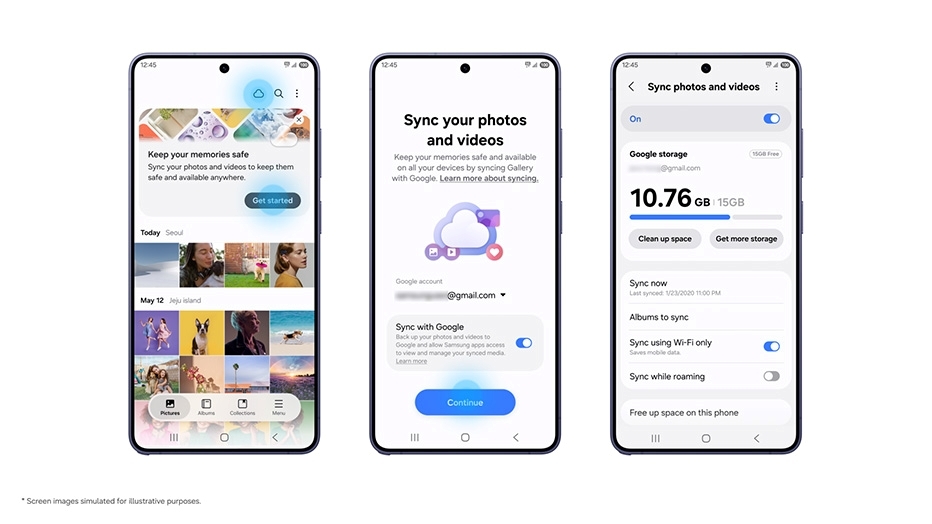
On a primary device, open the Gallery app, tap the cloud icon or the "Get started" tip card, then toggle "Sync photos and videos" on. On additional Galaxy devices, sign in with the same Samsung and Google accounts and enable sync in Gallery Settings. Previews of synced photos and videos appear automatically; original files stay in Google storage and can be downloaded on demand. A "Free up space" option removes local originals after sync while keeping thumbnails visible in Gallery.
Storage and limits
The service draws from the Google account's shared 15 GB free tier, which is also used by Gmail, Google Drive, and Google Photos. Gallery sync does not add a separate storage allowance. Paid expansion is available through Google One plans on the linked account. Samsung notes that available space depends on existing usage across those services.
Supported devices and rollout
The feature requires One UI 9 or later and is launching on select Galaxy phones and tablets, with a phased expansion to additional devices. Market availability varies by region, and the service may be unavailable in some markets due to regional restrictions. The "Free up space" feature's availability also varies by market and device model.
Migration from OneDrive
Direct sync between Samsung Gallery and OneDrive ended on September 30, 2026. Photos and videos previously synced to OneDrive remain accessible through the OneDrive app or website, but they do not automatically move to the new Google storage sync. Pre-existing content in Google Photos also does not appear in Samsung Gallery at launch — only media synced through Gallery after enabling the new feature will show up.
Deletion behavior
Deleting a synced item in Samsung Gallery removes it from the linked Google storage and from other connected Galaxy devices signed in with the same Samsung and Google accounts. This two-way deletion sync applies across all linked devices.